





Next to your SEO data
Keyword research, Site Audit and Rank Tracking live in the same project as your local scans, under one login.
Customers searching from different spots nearby see different Google Maps results. Run a local scan on a grid of up to 81 points and see your exact rank at each one, on one map.
Four steps take you from your business name to a full rank map.
Type your business name and pick it from the Google Maps suggestions. If it's in another city, set the location field first.
Pick a grid from 3×3 to 9×9 and the distance between points, then center it on your business or on any address.
Type the search your customers use, like "coffee shop near me" or "plumber in Austin". Each scan checks one keyword.
Check the credit cost and your balance, then run the scan. The map fills in point by point while you keep working.
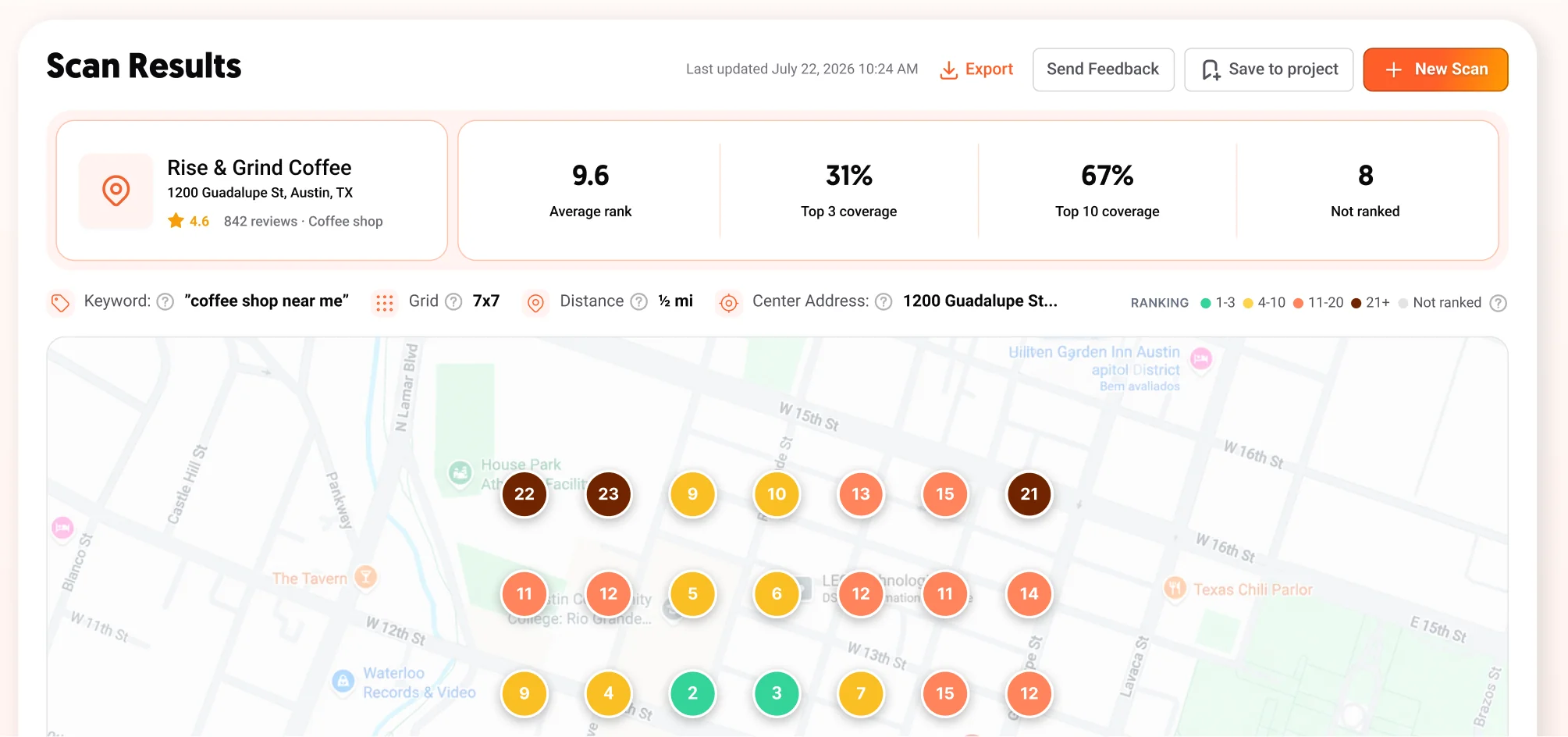
Every pin shows your exact Google Maps rank from that spot. Green is the top 3, yellow is 4 to 10, red is 11 to 20 and dark brown is 21 or lower. Gray pins mark points where you're not ranked.
Four metrics sum up every scan, so you know in seconds how visible your business is across the area. Coverage is the share of grid points where your business ranks in the top 3 or the top 10.
12.5
Average rank
16%
Top 3 coverage
37%
Top 10 coverage
2
Not ranked
Click any pin to see up to 100 businesses in the order Google Maps ranks them at that spot. Your business is marked, so you can see exactly who outranks you there.
Export any scan as a PDF and send it to a client, your team or the business owner, so everyone sees the same picture. Exporting doesn't use credits.
Most local SEO software is a separate subscription. In Ubersuggest, local scans sit next to your keyword research, Site Audit and Rank Tracking, and use the credits in your plan.
Keyword research, Site Audit and Rank Tracking live in the same project as your local scans, under one login.
Local SEO is included in every paid plan. Each scan uses 3 to 9 credits from the allowance you already have.
Scans stay in Recent Scans with no expiration. Open one anytime, or rerun it with the same settings to compare.
Google Maps ranks businesses partly by how close they are to the person searching. That's why you can be first for "coffee shop" on your own block and missing from the results a mile away.
Checking from your own phone only shows one spot. A local scan simulates a search from the exact location of each grid point, so you see how your local SEO rank changes across the whole area.
Cafés, gyms, clinics and shops that serve people nearby. Find the neighborhoods where customers can't find you yet.
Keep each client's scans in their own project, then export a PDF report when it's time to show their progress.
Run a scan before you update your listing or site, then rerun it with the same settings to see which points improved.
Local SEO is included in every paid Ubersuggest plan. Scans use credits from your plan's monthly allowance, the cost depends on the grid size, and you see it before the scan runs.
Opening a saved scan, clicking pins and exporting a PDF don't use credits. A rerun costs the same as a new scan, and if a scan fails, its credits go back to your balance.
See how many credits each plan includes| Grid | Points checked | Credits |
|---|---|---|
| 3×3 | 9 | 3 |
| 5×5 | 25 | 5 |
| 7×7 | 49 | 7 |
| 9×9 | 81 | 9 |
Local SEO is the work of getting a business to show up when people nearby search for what it offers, especially in Google Maps and the map results at the top of Google Search. Google ranks these results by how relevant a business is to the search, how far it is from the person searching, and how well known it is.
Open Local SEO and choose New Scan. Search for your business, set up the grid, enter one keyword and run the scan. You get a map with your Google Maps rank at every point, plus your Average rank, Top 3 coverage and Top 10 coverage.
Start typing your business name and Ubersuggest suggests matching Google Maps listings with their address, rating and number of reviews. If you don't see yours, set the location field to the city where your business is, then search again.
No. You only search for your business by name. Ubersuggest uses public Google Maps results, so there's nothing to connect or verify.
You choose the business, the scan center (your business address or any other address), the grid size from 3×3 to 9×9, the distance between points from ¼ to 2 miles or ½ to 5 kilometers, and the keyword.
Google Maps ranks businesses partly by how close they are to the person searching. Each grid point simulates a search from that exact spot, so your rank changes as the distance to your business changes.
NR means Not ranked: your business didn't appear in the Google Maps results at that point.
A 3×3 grid uses 3 credits, 5×5 uses 5, 7×7 uses 7 and 9×9 uses 9. You see the exact cost before the scan runs. Opening a saved scan doesn't use credits, and a rerun costs the same as a new scan.
You can try again or contact support, and the credits for the failed scan go back to your balance.
Each scan checks one keyword. Run a separate scan for each keyword you want to check. Ubersuggest remembers your business and grid settings, so you only need to type the new keyword.
Local SEO is included in every paid Ubersuggest plan, and scans use the credits in your plan. Check the pricing page to compare how many credits each plan includes.
See plans and pricing

Run your first local scan and see your rank at every point around your business, on one map.